Stay up to date with the latest features and improvements
Version 3.1.108
27th April 2026
Features
Enrolments pipeline live
A new admin Enrolments area with a pipeline grouped table, Quick Enrol seed, Start Meeting and Log Contact actions, hosted landing pages, and a public submission API so applications come straight into the right campus.
Plan Builder, Block Grid
A new layout block for tables and matrices. Add rows and columns, copy from above, duplicate rows, configure each cell as a real field, switch between radio and checkbox modes with custom options.
Plan Builder, Form Settings drawer
A cog on the Current Plan Agreement opens a Form Settings drawer where you can edit the submit button label, add a smaller consent notice, and configure agreement behaviour without leaving the canvas.
Plan Review Date sync
The Plan Review Date Junipa field stays in sync with the Agreement section, with a turn into action, toast polish, and version history captured on Publish, every ten minutes, and on leaving the editor.
Plan layout catalogue simplified
Layout blocks are now Heading 1, 2, 3, Divider and Description. Easier to scan, faster to build, no more guessing which heading style does what.
Bulk Import progressive disclosure
Step 1 and Step 2 reveal in sequence with a Sync from integration heading, an Import log toggle, Updates and Full sync tabs, and a clear empty state for new tenants.
Help and Contact Us refresh
The Help affordance is always visible, Contact Us opens a branded modal with a receipt confirmation, includes user roles in support metadata, and gates the contact channel on the new feature flag.
Students admin polish
A Columns toggle for Last Modified and Newest, a top scrollbar so wide tables stay reachable, and sensible display for future dated timestamps.
Version 3.1.66
22nd April 2026
Features
Scope and Sequence
A new curriculum planning area for mapping programs of work, scheduling units across terms, and building a shared library of adjustment strategies tagged to NCCD. Find it from the main dashboard.
Report Builder refresh
The report builder and viewer now share a consolidated editing experience. Row actions, drag handles, and field settings sit exactly where you expect them.
Microsoft login clarity
Staff logging in with Microsoft now see a provider specific message when their account is not registered. The screen no longer flashes a privileges warning while permissions load.
Evidence setup redesign
Evidence setup has moved to a clean table layout with inline activity log and row reordering. Easier to scan, faster to edit.
NCCD level chips
Adjustment level chips across reports and dashboards share one consistent colour palette aligned with the design system.
Version 3.1.24
26th March 2026
Improvements
Audit period bar
The auditor dashboard now displays the full NCCD census period at a glance. Two clickable segments show all students with recorded adjustments across the full audit period, or filter to only students enrolled in the current calendar year.
Export audit report fix
The CSV export now matches the visible student count exactly. Previously the export included students from older reporting years that were not shown on screen.
Version 3.1.20
24th March 2026
New Features
Case note @mentions
Mention staff in case notes using @ — they'll receive a real-time notification on their My Junipa page with a direct link to the student journal.
Inline @-trigger
Type @ in any case note textarea to open a staff picker right at your cursor. Works in both standalone case notes and evidence case notes.
My Junipa mention feed
Mentions now appear in the Communications inbox as "Case Note" items with an @ indicator. Use the "Mention" filter to see only your mentions.
Updates panel
A new centered updates panel replaces the sidebar popover — easier to read on all screen sizes, with support for images and videos.
Version 3.1.11
20th March 2026
New Features
Compass sync redesign
The student sync workflow has been completely rebuilt. A visual progress timeline guides you through each step, with clickable filter cards to review new, updated, and unenrolled students before confirming changes.
Unenrol panel
Students no longer found in your connected system are now presented in a dedicated unenrol panel with clear actions, replacing the previous "Not in Compass" list.
Field-level change highlighting
When inspecting student records during a sync, fields that differ between Junipa and the connected system are highlighted so you can see exactly what will change before importing.
Enhanced Journal
A new longitudinal view of student adjustments, featuring a day-column timeline, stakeholder contacts, evidence tracking, consent logging, and document uploads. Replaces Continual Adjustment Profiles.
Plan coverage page
A redesigned coverage view shows all enrolled students organised by year group, making it easier to identify which students have active plans and where gaps exist.
Responsive plan selector
On smaller viewports, the plan selector switches to a dropdown menu so all plans remain accessible without horizontal scrolling.
Smart auto groups
Automatic groups such as 11A or 12E now correctly filter by their specific label rather than the entire year level, and query live enrolment data for accurate student lists.
Grade labels in search
The student search modal now displays group labels (e.g. "11D", "12E") in the Grade column instead of just the year number, matching how year groups are configured in your school settings.
Version 3.0.141
17th March 2026
New Features
Customisable role permissions
Default roles such as Administrator, Teacher, and Case Manager can now have their permissions edited. A confirmation dialog shows before saving changes, and the permissions table header stays visible when scrolling long lists.
Integration Manager role
A new dedicated role controls access to the Sync tab and connected integration systems. Assign the Integration Manager role to staff who manage Compass or other data connections.
Pull-based sync from connected systems
Schools can now pull student data directly from connected integration platforms via the Sync tab, giving administrators more control over when data flows into Junipa.
Clearer privilege labels
Case note permission labels have been updated to remove misleading terminology, making it easier for administrators to understand what each privilege controls.
Report navigation and performance
Student names in the medical conditions and level distribution reports now correctly link to the student profile. The medical conditions report also loads faster through batched data retrieval.
Version 3.0.131
17th March 2026
New Features
Case note @mentions
Type @ in any case note to mention a colleague. A staff picker appears with keyboard navigation and search. Mentioned staff receive an in-app notification, making it easy to loop others into student discussions.
Case notes report enhancements
The case notes report now includes server-side date filtering and an adjustment category column showing NCCD level and sub-category for linked notes. Evidence-linked rows display a direct "View with evidence" action.
E-Signature risk acknowledgement
Enabling electronic signatures now requires administrators to acknowledge six risk and privacy points before activation. An immutable audit log records who enabled the feature, when, and the consent given.
My Junipa communications filtering
The My Junipa communications panel now supports filtering by type (Signature, Email, Message, Mention), a select-all checkbox, and improved table layout for managing inbox items.
Users page redesign
Team Management has been renamed to Users. The page now defaults to showing active users, highlights the selected row when actions are open, and shows both name and email in the remove access confirmation for added clarity.
Login experience improvements
The sign-in page now shows clearer error messages when an email is not registered, with inline options to switch accounts or request activation. Schools can configure custom login helper text to guide staff to the correct sign-in method.
Student detail and evidence log
The admin student detail view now uses the shared journal header layout. The evidence log displays case note text previews directly in the table, and the recorded-by column correctly shows full staff names.
Version 3.0.106
14th March 2026
New Features
Update Editor v2 — Items Library
The update composer now includes a dedicated Items Library with Items and Archive tabs. Click any saved item to add it to your update, or hover to archive items you no longer need.
Audience targeting
Updates can now be targeted to specific recipients. Choose from All Campuses, By Organisation, By Campus, By Role, or Individual staff members to ensure the right people see each announcement.
Scheduling and dismissal controls
A merged Schedule section lets you set end days, mark updates as dismissable, and attach a link URL. Scheduled sends display in Sydney timezone for consistent timing across campuses.
Video attachments on updates
Release items can now include video attachments hosted on media.junipa.com.au, making it easy to share feature walkthroughs and tutorials directly within update notifications.
Configure Media page
A new Media page under Configure provides a central view of all hosted videos, with playback tracking and usage details for each asset.
Version 3.0.103
13th March 2026
New Features & Improvements
Layout toggle
A global compact/wide layout toggle lets you switch between a tighter view and a spacious layout across all pages.
Group profile toolbar
Group pages now include a toolbar with a Back to Roster link, group adjustments button, group switcher dropdown, and an NCCD category toggle for filtering students by level of adjustment.
NCCD badges on auto groups
Automatically created groups now display NCCD category badges alongside student names.
Organisation logo in school settings
Schools that belong to an organisation can now display the organisation logo in their campus settings.
Student enrolments table
The enrolments table is now fully responsive with sticky student name columns, smooth horizontal scrolling, and properly layered dropdown menus.
Session replay improvements
Session replays now capture page navigation breadcrumbs, with improved upload reliability for longer recording sessions.
Stability improvements
Faster initial page load after signing in, corrected reporting year display across admin and journal views, and improved dropdown behaviour on calendar and activity pages.
Version 3.0.95
11th March 2026
New Features & Improvements
Enhanced Journal
Continual Adjustment Profiles have been renamed to Enhanced Journal. The student journal page now features a redesigned timeline view with a day-column dot grid, confidence indicators, monthly labels, and a clear visual spine for tracking evidence over time.
Case Notes report
A new Case Notes report in the reports hub lists all recorded case notes across the school, with the teacher activity view redesigned to clearly show activity dates.
Plan coverage page
The coverage page now displays all enrolled students grouped by year level, making it straightforward to identify which students have a plan in place and which do not.
Evidence Log report
A new Evidence Log report with NCCD category columns, pagination, and quick actions for reviewing recorded evidence entries.
Separate staff import
Staff imports are now handled through a dedicated wizard, separate from the student bulk import process.
Group profile improvements
Group profile pages have been refreshed with updated styling and a page drawer for viewing detailed group information.
Medical conditions sorted alphabetically
The medical conditions list and admin view now sort conditions alphabetically for easier reference.
Stability improvements
Plan roster correctly reflects archived and completed plan statuses, Compass sync no longer shows migrated staff in the users list, and feature flags are now enforced on all admin routes.
Version 3.0.82
5th March 2026
New Features & Improvements
Plan export wizard
A new unified export wizard lets you export student plans as CSV or PDF directly from the roster view. Choose your student scope, pick a PDF template, and optionally categorise students by whether they have a plan in place.
Split export button
The roster toolbar now uses a split button for exports, with a dropdown chevron to open the export wizard and quick-access to the default CSV export.
Filter bar standardisation
Roster filter controls have been migrated from hardcoded CSS to reusable design system tokens, providing a consistent 30px control height and automatic dark mode support across all filter bars.
UI polish
Checkbox labels now align to the top line of multi-line text, export format selection uses a toggle button group, and the export modal is top-anchored to prevent layout shift when options expand.
Version 3.0.81
3rd March 2026
New Features & Improvements
CAP activation and evidence tracking
Activate a Continual Adjustment Profile for individual Extensive students with stakeholder contacts, document uploads, consent logging, and a chronological evidence view.
Medical conditions report
A new school-wide report lists students with recorded medical conditions, filterable by year level and condition type, exportable to PDF.
Branded invite emails
Staff invitation emails now use a branded template, and the Team Management page shows each staff member's sign-in method alongside their role.
Roster CSV export
Export student rosters to CSV directly from the roster view.
Compass sync improvements
Compass imports now show form grade, student code, and year level in the preview table, with an option to automatically create smart groups from imported cohort data.
Email template editor
Preview and edit system email templates (invitation, password reset, account confirmation) directly from Junipa settings.
Stability improvements
Faster dashboard loading for schools with many student groups, improved sidebar layout, and dark mode support for attendance analysis.
Version 3.0.72
1st March 2026
New Features
Continual Adjustment Profiles (CAP)
In response to the 2026 NCCD Guidelines, which clarify that Extensive adjustments must be in place at all times and are exempt from the flexible 10-week counting available to other levels of adjustment, Junipa now includes a dedicated Continual Adjustment Profile workflow. CAP introduces five key capabilities for schools managing students at the Extensive level.
Always-on evidence tracking: CAP enforces continuous adjustment documentation across the full school day, replacing the episodic logging used for Supplementary and Substantial levels.
Parent/carer consent workflows: Send, track, and store consent requests directly within Junipa with real-time status visibility and automated reminders.
Coverage indicators: A visual dashboard showing whether adjustment evidence spans the student's full timetable, flagging gaps before they become compliance risks.
SSG meeting integration: Link Student Support Group minutes directly to the student's CAP, with frequency prompts that flag when an Extensive student is overdue for review.
Audit-ready reporting: Generate compliance summaries per student that clearly demonstrate adjustments were in place at all times, aligned to NCCD evidence expectations for the Extensive level.
Reference: 2026 NCCD Guidelines, Section C.3.1
Account request relay
Staff accounts can now be requested through the organisation portal, streamlining onboarding for schools that are part of a multi-campus organisation.
NCCD cadence reporting
A new predictive report shows the projected pace of NCCD evidence collection, helping coordinators identify students who may fall behind before census deadlines.
Smart group caching
Student group lists now use background caching, significantly improving page load speed when returning to previously viewed groups.
Teams management redesign
The Team Management page has been refreshed with authentication provider details, sign-in method management, and a clearer layout for managing staff access.
Sign-in reliability improvements
Multi-provider sign-in race conditions have been resolved, and login confirmation feedback has been improved with clearer success and error states.
Version 3.0.40
17th February 2026
New Features
Student unenrolment
Administrators can now unenrol students and move their records to a new Previous Students section, preserving the full record for reference while removing them from active rosters and analytics.
Previous Students section
A dedicated area in Administration lists all previously enrolled students with search, year, and method filters for easy lookup.
Batch graduation review
A banner on the Students page alerts administrators when students have no current-year enrolment, allowing them to review and graduate students in bulk.
Deep links to group adjustments
Clicking a group card on the dashboard now opens the correct adjustment modal directly, making it faster to continue evidence collection from where you left off.
Group adjustment modal redesign
The group adjustment modal now uses an accordion layout, making it easier to navigate between evidence categories when recording adjustments.
Version 3.0.38
14th February 2026
New Features
NCCD cadence report
A new predicted cadence report helps schools monitor their adjustment collection pace against census targets.
Staff import improvements
Select individual staff members to import from Compass using checkboxes, rather than importing all at once.
Teams management redesign
The Teams table in Administration has been refreshed with a cleaner layout, faster loading, and clearer "Add User" terminology.
Authentication provider details
Administrators can now view and manage how each staff member signs in, including the ability to unlink a sign-in method.
Sign-in reliability
Resolved an issue where some users could encounter errors when signing in for the first time or after a period of inactivity.
Role assignment fix
Fixed an error that could occur when changing a staff member's role from the administration panel.
Version 3.0.27
9th February 2026
New Features
Notifications inbox
A new bell icon in the header shows unread messages and updates. Click to open the communications inbox without leaving your current page.
Duplicate student finder
Identify and merge duplicate student records from the Administration panel. Review potential matches side by side and merge with one click.
Enrolment report improvements
The enrolment report has been redesigned with improved filters, accurate data sources, and a cleaner table layout.
NCCD reporting accuracy
Student statistics now correctly reflect only those students with active NCCD enrolments for the current reporting year.
Smoother dashboard loading
The groups dashboard now shows loading placeholders while data is fetched, and group cards no longer flicker when navigating back.
New user default view
New staff accounts now land on the Groups view by default, with a visible account creation date in the admin panel.
Version 3.0.22
5th February 2026
New Features
Wonde student sync
Schools using Wonde can now sync student data directly into Junipa. An incoming sync tab in the import wizard shows matched and new students before confirming.
Compass integration
Junipa now supports receiving student data from Compass, with automatic matching to existing records.
NCCD data preserved on advancement
When students advance to a new year level, their existing NCCD category, disability, and adjustment data is carried forward automatically.
Smarter import defaults
The import wizard now defaults to the correct year level and pre-selects sensible options, reducing manual steps for administrators.
Improved student matching
Better duplicate detection during imports, preventing the same student from being created twice.
Sync timestamps
Each import now records a clear date and time, making it easy to see when data was last synchronised.
Version 3.0.8
3rd February 2026
Improvements
Live import progress
The bulk import wizard now shows real-time status for each student as they are processed, with a live results list and per-student outcome.
Overwrite disability data control
Choose whether to overwrite existing disability information when importing students, with sortable columns for easier review.
Google sign-in reliability
Resolved an issue where Google sign-in could fail on some school networks.
Feature flag management
Schools can now have features like Year Rollover enabled or disabled centrally, with role-based access for administrators.
Version 3.0
1st February 2026
Major Release
Fresh New Look
Junipa has been completely redesigned with a modern, professional visual style. Every screen has been refined for better clarity, consistency, and ease of use.
Multi-Campus Overview
Organisations managing multiple campuses can now view aggregated student data, NCCD compliance status, and reporting across all their schools from a single dashboard.
Bulk Student Editing
Update multiple student records at once. Select students and edit common fields like year level, NCCD category, or group membership in a single action.
Modernised Admin Experience
All administration modules now feature the new design language, with improved navigation, cleaner layouts, and more intuitive controls.
Streamlined Student Management
Student tables and management interfaces have been redesigned for faster scanning and easier operations.
Version 2.32
9th January 2026
New Features
Microsoft Entra ID Single Sign-On
Schools using Microsoft 365 can now sign in with their existing Microsoft accounts, streamlining access for staff and reducing password fatigue.
Year-Rollover Wizard
A guided wizard helps administrators transition to the new school year. Automatically archives previous year data, promotes students to new year levels, and validates that everything is ready before the new term begins.
Mobile-Friendly Login
The login page is now fully responsive on mobile devices, making it easier for staff to access Junipa from phones and tablets.
Version 2.31
12th December 2025
Enhancements
Plan Attachments
Upload supporting documents directly to student plans. Attachments are securely stored and accessible alongside plan content.
Student Photos in Plans
Student photos now appear in the plan editor, helping staff quickly identify students when working on their plans.
Enhanced Conditional Logic
Form rules now work more reliably with nested fields and repeatable tables, making complex plan templates behave exactly as intended.
Version 2.30
28th November 2025
New Features
Groups by Student View
A new way to see all the groups a student belongs to at a glance, making it easier to understand group membership and manage student organisation.
Smart Groups Redesign
Smart groups now feature a tabbed interface, global search, and an improved matrix layout for better visibility across year levels and categories.
Template Archive and Restore
Plan templates can now be archived when no longer needed and restored later, keeping your template library clean and organised.
Bulk Import Results Display
Improved results view after bulk imports now shows expandable details, making it easier to review what was imported and catch any issues.
Version 2.29
13th November 2025
Major Update
Smarter Conditional Logic
Field rules now recognise keys as well as identifiers and labels, bringing reliable targeting to deeply nested questions while adding repeatable table awareness so complex forms respond exactly as intended.
Hidden Field Clarity
Restored styling and tooltip content keeps hidden controls obvious to reviewers, preventing accidental omissions during audits.
Likert Scale Builder
Form authors can configure and style Likert scales directly inside the builder, making it faster to capture perception data without custom code.
Student Plan Enhancements
Plan forms now normalise data consistently, highlight the most recent adjustment, and handle legacy records without manual cleanup, giving leaders greater confidence in evidence packs.
Audit and Performance Improvements
The auditor dashboard formats key dates correctly and supports horizontal scrolling for large cohorts, while the new roster cache rebuild tools keep roll data in sync.
Version 2.28
27th June 2025
New Features
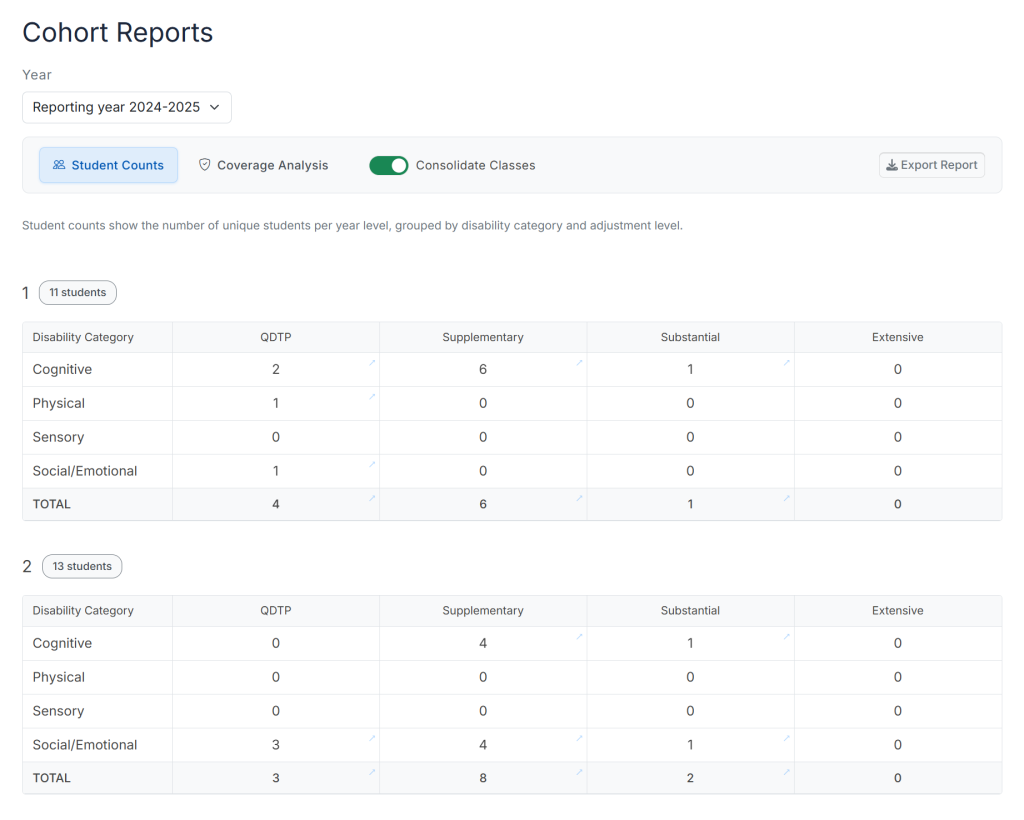
Cohort Report with Student Count
Shows the number of students with disabilities in each year level and category, providing the data foundation needed for staffing decisions and compliance with NCCD.
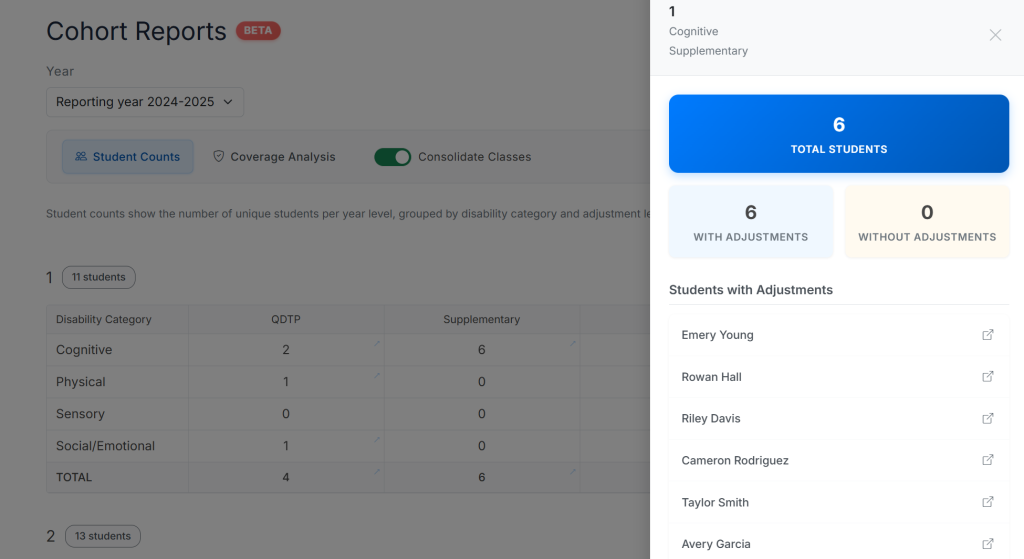
Cohort Grouping and Callout
Identify the Students that meet the criteria for further analysis.
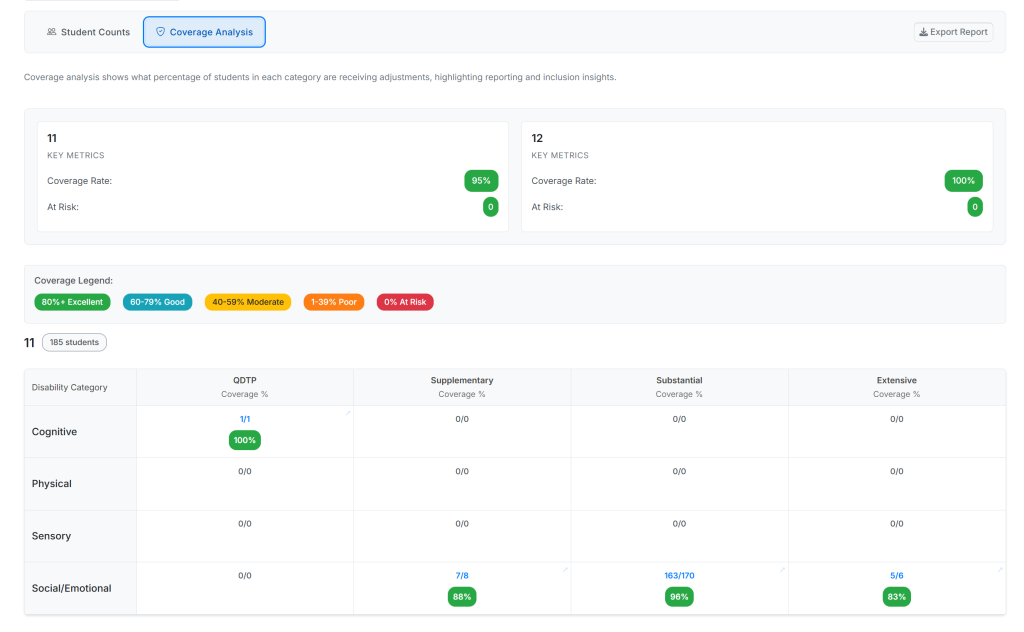
Coverage Analysis
Identifies gaps in special needs support by showing which students aren't receiving documented adjustments, helping schools improve compliance and ensure no student falls through the cracks.
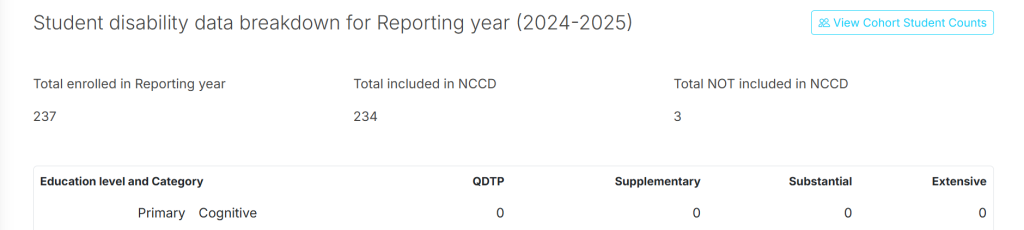
In-Context Reporting
Evidence Overview NCCD Summary also connects staff directly to the new Cohort report
CSV Export
Audit Report and Cohort Report now support Export to CSV
Version 2.27.4
26th May 2025
Improvements
Clearer breakdown of Adjustment types
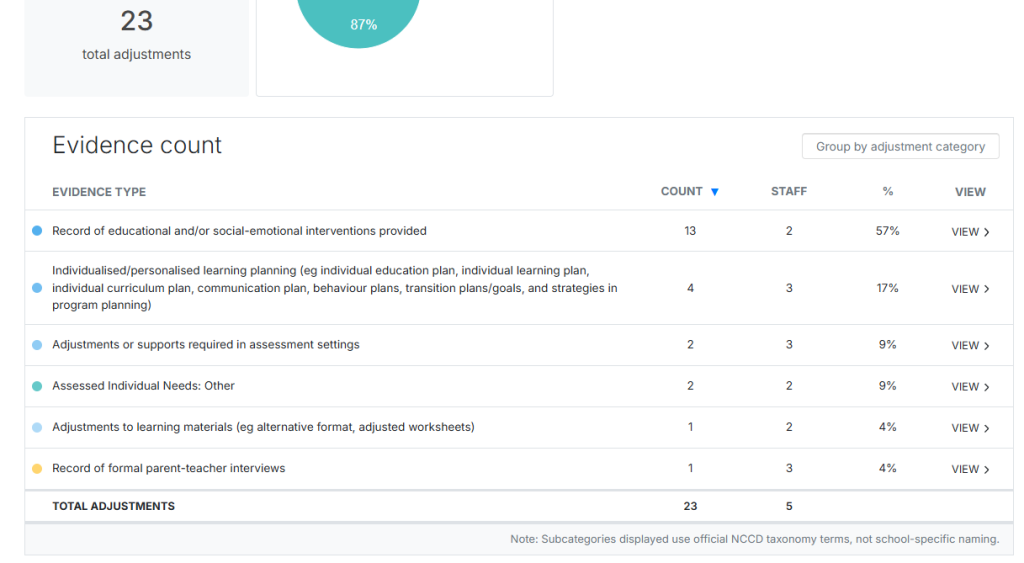
The Student Journal now shows an Evidence count table that clearly shows the types of adjustment, and number of staff per each adjustment type.
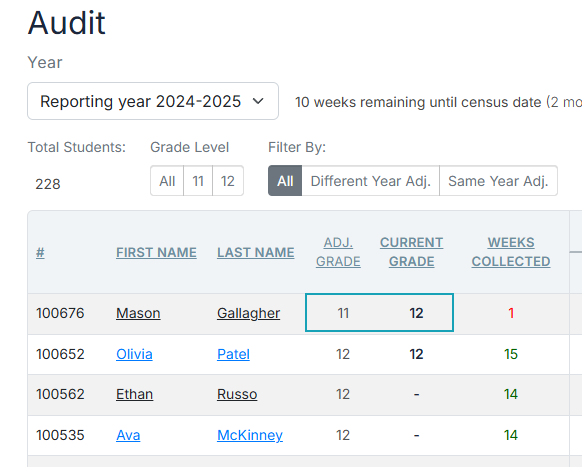
Auditor Dashboard shows Grade when Last adjustment was made
If a student's most recent adjustment was in a previous year, the Audit dashboard will now identify this.
Global list of students now available
Administrators can now see all current year students in an A-Z list, sortable by Grade or NCCD status.
Version 2.21.0
19th May 2025
Features
Audit Dashboard
Added comprehensive audit dashboard for tracking NCCD compliance.
Last Adjustment Column
Added last adjustment column to help track recent student adjustments.
View Button Integration
Added view button within Audit Dashboard linking directly to Evidence and Student Journal pages.
Version 2.20.0
15th May 2025
Major Update
Enhanced Student Adjustment Subcategories
Improved visualization of student adjustment subcategories for better tracking.
Color-coded Evidence Type Grouping
Evidence types are now color-coded with percentage metrics for easier identification.
Evidence Filtering
Filter evidence by category and subcategory for more targeted analysis.
Show All Logs Option
Added "Show all logs" option when filtering produces no results.
Expanded Student Activity Log
Enhanced student activity log viewer with time period options for better historical tracking.
Version 2.19.106-107
3rd March 2025
Features
Student Photos Support
Added support for student photos in the system.
Updated Student Photo and Enrolments UI
Improved user interface for managing student photos and enrolments.
Version 2.19.81-105
12th February 2025
Improvements
ALL Groups Button
Added convenient "ALL Groups" button for easier navigation.